
iBlueSky (mindmapping)4.1.1 - App Store
You'll be able to see results in few seconds.
Publisher Description


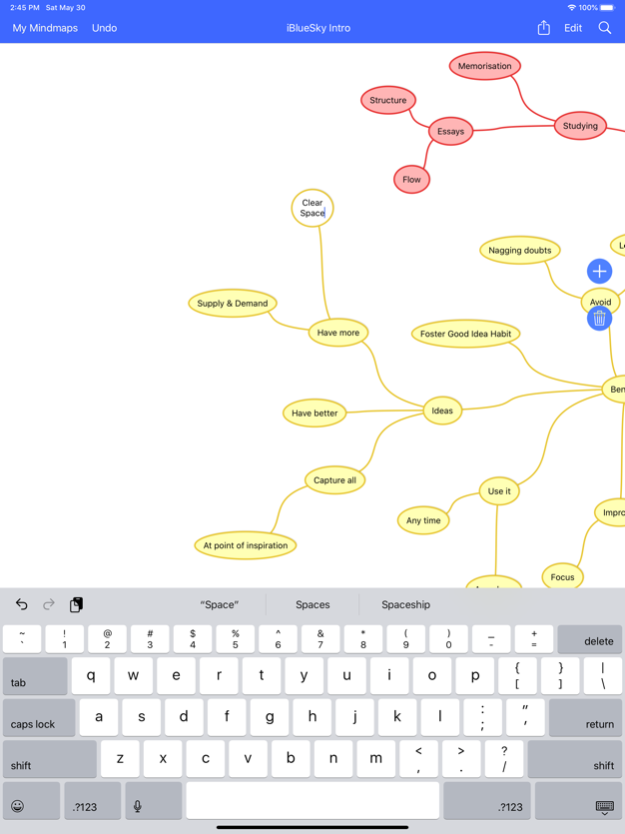
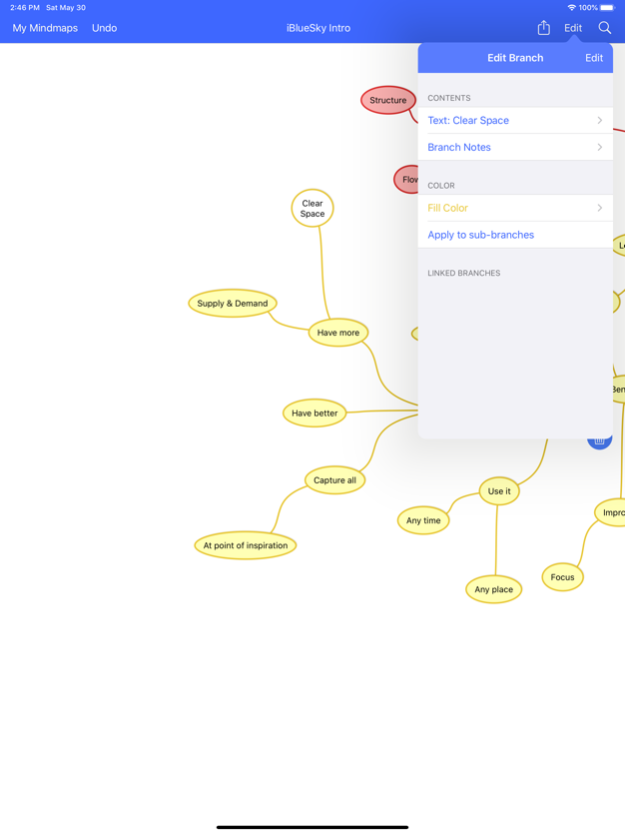
Elegant, intuitive & clutter-free mind mapping. Wherever inspiration strikes. Capture, develop and organize your best ideas. Realise your full potential with iBlueSky.
Key Features:
- Optimized for iPad Pro, iPad, iPhone & iPod Touch (only one purchase required to run with an optimized experience on all device types).
- Huge page size
- Easy import via the web in Freemind & OPML formats
- Easy export via email in these formats: PDF, PNG (limited to 4000x4000 pixels), OPML outlining format, Freemind, plain text
- Branches with more than one line of text
- Link branches
- Attach notes to branches (imported and exported in most external formats)
- Edit branch colours with an easy-to-use color picker, option to apply color changes to sub-branches
- Clipboard: cut, copy and paste branches
- Scroll and zoom - standard pinch gesture
- Double tap to zoom in and out
- Auto-hiding toolbars
Version History - Fix for a crash when importing projects
- Links between branches are now exported/imported correctly 4.1.1 08/28/2020 - Branches can now be Linked
- Improved support for the latest devices
- Many small fixes and improvements 4.1.0 05/30/2020 Improved compatibility with Dropbox. 4.0.6 02/08/2018 - Optimised for latest iOS devices
- Improved compatibility with the latest versions of iOS
- Updated user interface
- New mind map browser on iPad
- Multi-tasking support on iPad
- Added Redo support (tap and hold on Undo button on iPad)
- Mind maps are now emailed via the iOS Mail.app
- Bug fixes
- Updated app icon 4.0.5 04/03/2017 - Added auto-scroll when dragging branches to the edges of the screen
- OPML files can now be imported directly into iBlueSky from other applications (e.g. Dropbox)
- Fixed email address book lookup bug for “unified” contacts with multiple email addresses.
- Can now email projects to email addresses containing a ‘+’ character 3.2 12/13/2013 3.1.1
- Bug fixes for pasting branches and Dropbox integration
3.1
- Improved compatibility with iOS 7
- "Open In…" support for iBlueSky's native .bsky file format, allowing mind maps to be shared between devices more easily, via services like Dropbox and Box.net
- AirDrop support for sharing mind maps between nearby devices (requires iOS 7 and device support)
- All mindmaps can now be backed up to Dropbox
- Numerous bug fixes and small improvements
Please contact support if you experience any problems; we would love to help. 3.1.1 10/19/2013 Fixes a crash when dragging a branch while still editing the text in another branch. 3.0.5 01/17/2013 - Full support for iPhone 5 and iPod touch 5th generation
- Fixed occasional crash on undoing actions triggered from the branch context menu
- Fixed occasional crash on scrolling documents in the document browser on iPad
- It's now possible to log into Box.net if your password contains a "%" character 3.0.4 12/03/2012 - New projects are now always named after the most central topic in a mindmap.
- Fixed memory leak in branch color picker and mind map browser.
- Mindmap search button is now enabled again after deleting all mind maps and creating a new one.
- Projects are now imported OK if the app was left with the About screen visible when last backgrounded.
- Updated Facebook Like in the About screen to work with the latest Facebook iOS app.
- Further Box.net fixes. 3.0.3 11/10/2012 Improved compatibility with with iOS 6 and The New iPad.
Bug fixes, stability and performance improvements. 3.0.2 10/13/2012 - Full support for iPad, with optimised user interface.
- Scrolling mindmaps is now more responsive
- Mindmap canvas now grows as required (effectively unlimited in size)
- Search across all projects
- Search within mindmaps
- Branch context menu (Cut, Copy & Paste); touch and hold on a branch to access
- Multi-level undo (shake to undo on iPhone)
- Improved support for external keyboards 3.0.1 05/21/2011 - Compatibility with iOS 4, including multi-tasking, preference changes and support for hardware keyboards
- Save project data more often (reduces chance of loosing data due to exhausted battery)
- Mindmap is now visible through transparent status bar on all supported OS versions
- It's now easier to drag branches containing lots of text
- Include more information when emailing support (device type, OS version)
- Provide more useful error messages when importing or exporting projects and connectivity is not available
- Improved compatibility with Box.net
- Include device name in folders created in Box.net to make it easier to identify backups
- About screen updates and improvements
- Numerous small fixes and improvements
A major feature update is coming. 2.11 06/23/2010 - Integration with Box.net - save a copy of all your projects in iBlueSky's native .bsky format to your free or premium Box.net account (use the menu button in the bottom left of the project list to access this feature).
- Minor bugfixes and improvements 2.10 08/17/2009 Bug fix for mis-aligned text during branch text entry under OS 3.0. 2.02 07/03/2009 2.01 06/27/2009 2.0 05/31/2009 1.01 10/07/2008 1.0 09/27/2008
About iBlueSky (mindmapping)
The company that develops iBlueSky (mindmapping) is Andrew Ebling. The latest version released by its developer is 4.1.1.
To install iBlueSky (mindmapping) on your iOS device, just click the green Continue To App button above to start the installation process. The app is listed on our website since 2026-10-16 and was downloaded 0 times. We have already checked if the download link is safe, however for your own protection we recommend that you scan the downloaded app with your antivirus. Your antivirus may detect the iBlueSky (mindmapping) as malware if the download link is broken.
How to install iBlueSky (mindmapping) on your iOS device:
- Click on the Continue To App button on our website. This will redirect you to the App Store.
- Once the iBlueSky (mindmapping) is shown in the iTunes listing of your iOS device, you can start its download and installation. Tap on the GET button to the right of the app to start downloading it.
- If you are not logged-in the iOS appstore app, you'll be prompted for your your Apple ID and/or password.
- After iBlueSky (mindmapping) is downloaded, you'll see an INSTALL button to the right. Tap on it to start the actual installation of the iOS app.
- Once installation is finished you can tap on the OPEN button to start it. Its icon will also be added to your device home screen.
Program Details
System requirements
Download information
Pricing
Version History
version 4.1.1
posted on 2026-10-16
Version History - Fix for a crash when importing projects
- Links between branches are now exported/imported correctly 4.1.1 08/28/2020 - Branches can now be Linked
- Improved support for the latest devices
- Many small fixes and improvements 4.1.0 05/30/2020 Improved compatibility with Dropbox. 4.0.6 02/08/2018 - Optimised for latest iOS devices
- Improved compatibility with the latest versions of iOS
- Updated user interface
- New mind map browser on iPad
- Multi-tasking support on iPad
- Added Redo support (tap and hold on Undo button on iPad)
- Mind maps are now emailed via the iOS Mail.app
- Bug fixes
- Updated app icon 4.0.5 04/03/2017 - Added auto-scroll when dragging branches to the edges of the screen
- OPML files can now be imported directly into iBlueSky from other applications (e.g. Dropbox)
- Fixed email address book lookup bug for “unified” contacts with multiple email addresses.
- Can now email projects to email addresses containing a ‘+’ character 3.2 12/13/2013 3.1.1
- Bug fixes for pasting branches and Dropbox integration
3.1
- Improved compatibility with iOS 7
- "Open In…" support for iBlueSky's native .bsky file format, allowing mind maps to be shared between devices more easily, via services like Dropbox and Box.net
- AirDrop support for sharing mind maps between nearby devices (requires iOS 7 and device support)
- All mindmaps can now be backed up to Dropbox
- Numerous bug fixes and small improvements
Please contact support if you experience any problems; we would love to help. 3.1.1 10/19/2013 Fixes a crash when dragging a branch while still editing the text in another branch. 3.0.5 01/17/2013 - Full support for iPhone 5 and iPod touch 5th generation
- Fixed occasional crash on undoing actions triggered from the branch context menu
- Fixed occasional crash on scrolling documents in the document browser on iPad
- It's now possible to log into Box.net if your password contains a "%" character 3.0.4 12/03/2012 - New projects are now always named after the most central topic in a mindmap.
- Fixed memory leak in branch color picker and mind map browser.
- Mindmap search button is now enabled again after deleting all mind maps and creating a new one.
- Projects are now imported OK if the app was left with the About screen visible when last backgrounded.
- Updated Facebook Like in the About screen to work with the latest Facebook iOS app.
- Further Box.net fixes. 3.0.3 11/10/2012 Improved compatibility with with iOS 6 and The New iPad.
Bug fixes, stability and performance improvements. 3.0.2 10/13/2012 - Full support for iPad, with optimised user interface.
- Scrolling mindmaps is now more responsive
- Mindmap canvas now grows as required (effectively unlimited in size)
- Search across all projects
- Search within mindmaps
- Branch context menu (Cut, Copy & Paste); touch and hold on a branch to access
- Multi-level undo (shake to undo on iPhone)
- Improved support for external keyboards 3.0.1 05/21/2011 - Compatibility with iOS 4, including multi-tasking, preference changes and support for hardware keyboards
- Save project data more often (reduces chance of loosing data due to exhausted battery)
- Mindmap is now visible through transparent status bar on all supported OS versions
- It's now easier to drag branches containing lots of text
- Include more information when emailing support (device type, OS version)
- Provide more useful error messages when importing or exporting projects and connectivity is not available
- Improved compatibility with Box.net
- Include device name in folders created in Box.net to make it easier to identify backups
- About screen updates and improvements
- Numerous small fixes and improvements
A major feature update is coming. 2.11 06/23/2010 - Integration with Box.net - save a copy of all your projects in iBlueSky's native .bsky format to your free or premium Box.net account (use the menu button in the bottom left of the project list to access this feature).
- Minor bugfixes and improvements 2.10 08/17/2009 Bug fix for mis-aligned text during branch text entry under OS 3.0. 2.02 07/03/2009 2.01 06/27/2009 2.0 05/31/2009 1.01 10/07/2008 1.0 09/27/2008
version 4.1.1
posted on 2020-08-28
Aug 28, 2020
Version 4.1.1
- Fix for a crash when importing projects
- Links between branches are now exported/imported correctly
Disclaimer
Official App Store Link
We do not host iBlueSky (mindmapping) on our servers. We did not scan it for viruses, adware, spyware or other type of malware. This app is hosted by Apple and passed their terms and conditions to be listed there. We recommend caution when installing it.
The App Store link for iBlueSky (mindmapping) is provided to you by apps112.com without any warranties, representations or guarantees of any kind, so access it at your own risk.
If you have questions regarding this particular app contact the publisher directly. For questions about the functionalities of apps112.com contact us.
